

Not everyone wants to be on camera. Maybe you are shy, maybe you value your privacy, or maybe you simply do not have the time to film and edit yourself. The good news is that you do not have to. Millions of people watch videos where the creator never appears on screen, and the tools to make them are easier than ever.
In this guide, I will show you how to start a faceless YouTube channel step by step, using simple AI tools and a smart workflow. Whether you are a complete beginner or just curious, you will find practical advice you can use today.
What Is a Faceless YouTube Channel?
A faceless channel is a channel where the creator does not show their face. Instead, the videos use voiceovers, screen recordings, animations, stock footage, or text on screen. You can start a YouTube channel without showing your face and still build a real audience, a brand, and even income.
Why Faceless Channels Are Popular in 2026
- Privacy: You keep your identity private if you want to.
- Lower barrier: No camera setup, no makeup, no perfect room.
- Scalability: You can outsource or reuse parts of your workflow.
- Flexibility: You can cover almost any topic.
This makes a faceless YouTube channel for beginners one of the most approachable ways to enter content creation.
Why Human Input Still Matters (E-E-A-T, GEO, and UX)
Here is something many tutorials skip. AI makes content faster, but it does not make content valuable on its own. In 2026, platforms and search engines reward real Experience, Expertise, Authoritativeness, and Trustworthiness (E-E-A-T). Viewers can tell when a video is just robotic text read over random clips.
Also, search is changing. AI Overviews and zero-click results often answer questions without sending people to a website. This is why Generative Engine Optimization (GEO) matters. Give clear, direct answers in your video descriptions and companion blog posts, use clear headings, and show who you are as the creator. Good user experience (UX) matters too: clean audio, readable captions, and a smooth flow keep people watching.
Use AI as your assistant, not your replacement. Add your own opinions, examples, and lessons.
How to Make a Faceless YouTube Channel: Step by Step
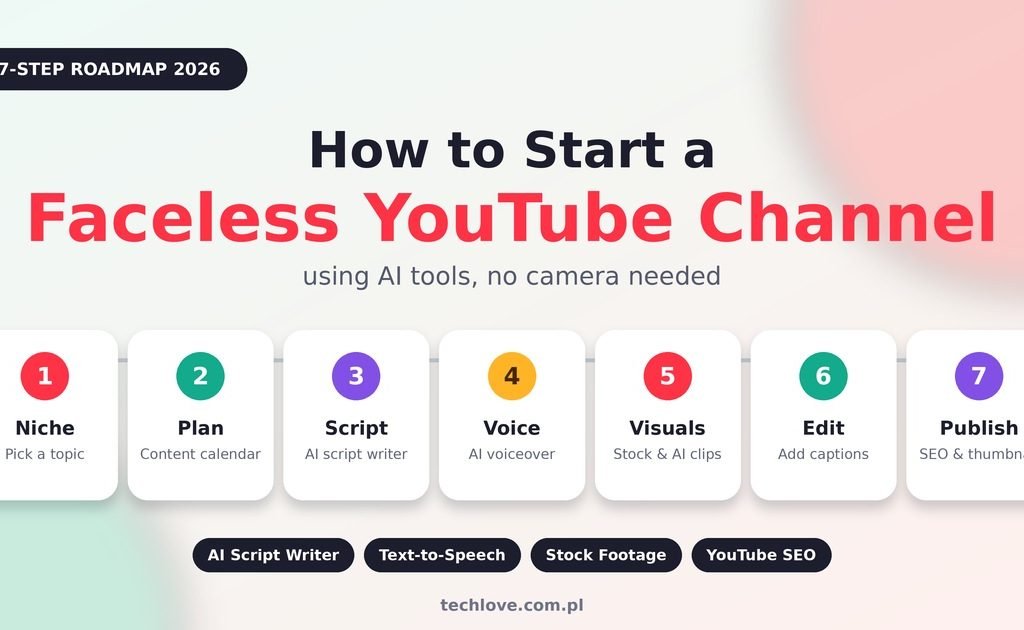
Here is the simple process for how to make a faceless YouTube channel from zero.
- Choose your niche and audience.
- Plan your content calendar.
- Write your script with AI help.
- Create the voiceover.
- Add visuals and edit.
- Design your thumbnail and write your title.
- Upload and optimize for YouTube SEO.
Let us go through each one.
Step 1: Pick From Faceless YouTube Niches
Your niche decides everything, so choose carefully. Pick a topic you can stay interested in for months and one where viewers have real questions. Popular faceless YouTube niches include:
- Personal finance and budgeting basics
- Tech tips and software tutorials
- Study tips and education
- History and storytelling
- Productivity and self-improvement
- Health and wellness basics (be careful and stick to well-sourced information)
- Gaming guides and walkthroughs
- Travel facts and destination guides
If you are searching for faceless YouTube channel ideas, try this trick: type a topic into YouTube search and note the auto-suggestions. Those are real questions people ask.
Step 2: Build a Content Calendar
Consistency beats perfection. A simple content calendar keeps you from running out of ideas.
- Plan 10 video ideas before you publish the first one.
- Pick a realistic schedule, such as one video per week.
- Mix one broad topic with specific, helpful ones.
- Track what works using YouTube Studio.
Step 3: Use an AI Script Writer
This is where a faceless YouTube channel using AI really helps. An AI script writer can give you an outline and a first draft in minutes. Tools like ChatGPT, Claude, or Gemini work well for this.
A simple prompt might be: “Write a friendly 5-minute script for beginners explaining how to save money on groceries, with a strong hook in the first 15 seconds.”
Then edit the script. Add a personal story, remove fluffy lines, and make it sound like you talking to one friend. A strong hook in the first seconds helps your audience retention.
Step 4: Create an AI Voiceover
Good audio matters more than fancy visuals. You have two options:
- Record your own voice: Best for trust and personality, even if your face stays hidden.
- Use AI voiceover and text-to-speech: Fast and useful if you are not comfortable speaking or if English is not your first language.
Tools such as ElevenLabs, Murf, or built-in editor voices are popular choices. Always listen to the full result, fix odd pronunciations, and add pauses. Check each tool’s terms for commercial use.
Step 5: Add Visuals With an AI Video Generator and Stock Footage
You have several ways to build visuals:
- Stock footage from sites like Pexels or Pixabay
- Screen recordings for tutorials
- AI video generator tools for short clips and animated scenes
- Simple slides, charts, and text animations
Match your visuals to your words. If the voice mentions a budget, show a spreadsheet or a calculator. Relevant visuals keep viewers watching.
Step 6: Edit With Video Editing Software
Beginner-friendly video editing software includes CapCut, DaVinci Resolve (free version), and Canva Video. Add captions, background music that is licensed for use, and light sound effects. Keep your pacing quick, and remove long pauses.
Step 7: Thumbnail Design, Titles, and YouTube SEO
Your thumbnail and title decide whether people click. For thumbnail design, use big readable text, a clear subject, and strong contrast. Canva works well for this, and AI image tools can help create backgrounds.
For YouTube SEO, follow these steps:
- Put your main keyword near the start of the title.
- Write video titles and descriptions that are clear and honest, not clickbait.
- Add the main keyword in the first two lines of the description.
- Use chapters and captions to help viewers and search engines.
- Add a short summary in the description so AI search tools can understand the video.
Best AI Tools for Faceless YouTube Channel: Comparison Table
Here is a quick overview of useful AI tools for faceless YouTube channel workflows.
| Task | Example Tools | Best For | Beginner Friendly |
|---|---|---|---|
| Script writing | ChatGPT, Claude, Gemini | Outlines and drafts | Yes |
| Voiceover | ElevenLabs, Murf | Natural AI voices | Yes |
| Video visuals | Pexels, Pixabay, AI video tools | Stock and generated clips | Yes |
| Editing | CapCut, DaVinci Resolve | Cutting and captions | Yes |
| Thumbnails | Canva, AI image tools | Eye-catching covers | Yes |
| SEO research | YouTube search, VidIQ, TubeBuddy | Keywords and ideas | Moderate |
Features and pricing change often, so check each tool’s website before you commit.
YouTube Monetization and the YouTube Partner Program
Many people ask whether faceless channels can earn money. Yes, they can, but you must follow YouTube’s rules. To earn ad revenue, you need to join the YouTube Partner Program, which has requirements such as subscriber and watch time thresholds. These numbers can change, so always confirm them in YouTube’s official help pages.
Also know that YouTube has been strict about low-effort, mass-produced, or repetitive content. Channels that simply copy and paste AI output may struggle with YouTube monetization. Focus on watch time and audience retention by making videos that truly help people.
Other income ideas include affiliate links (with clear disclosure), digital products, and sponsorships. Do not expect quick or guaranteed income, because results depend on niche, quality, and consistency.
Pros and Cons of Faceless YouTube Channels
Pros
- Keeps your privacy and removes camera stress
- Easy to start with low cost
- Flexible workflow and topics
- Can be built into a brand over time
Cons
- Harder to build a personal connection
- Competition from many similar channels
- AI voices and visuals can feel generic
- Policy and platform rules change
Practical Tips for Beginners
- Start small. One good video beats five rushed ones.
- Study your analytics. Watch where viewers drop off and fix those parts.
- Be transparent. Follow YouTube’s guidelines about disclosing altered or synthetic content where required.
- Respect copyright. Use licensed footage, images, and music only.
- Build a presence. A simple blog or social page helps people trust you and helps with GEO.
Frequently Asked Questions
1. Can I start a YouTube channel without showing my face? Yes. Many successful channels use voiceovers, screen recordings, animation, or stock footage.
2. Is a faceless YouTube channel for beginners a good idea? Yes, because it removes camera pressure and lets you focus on learning the basics of content creation.
3. What are the best faceless YouTube niches? Finance basics, tech tutorials, education, history, productivity, and travel are common choices. Pick one you enjoy.
4. Do I need to speak or can I use an AI voiceover? You can use either. A natural, well-edited AI voice works, but your own voice often builds more trust.
5. What AI tools do I need to start? An AI script writer, a voiceover tool, a video editor, and a thumbnail maker are enough for most beginners.
6. Can I monetize a faceless YouTube channel? Yes, if you meet YouTube Partner Program requirements and follow the content policies.
7. How long does it take to get monetized? It varies widely. Consistency, quality, and audience retention matter more than speed.
8. Will YouTube remove AI-generated videos? Not automatically. But low-effort, repetitive, or misleading content can face restrictions, so add real value.
9. How often should I upload? One video a week is a realistic start. Choose a schedule you can keep for months.
10. Do I need expensive equipment? No. A computer, a basic microphone if you record your voice, and free or low-cost software are enough.